
Sector-Level Snapshot Software: How It Works and How It Compares
A snapshot can return a Windows endpoint to an earlier state without rebuilding the entire drive, but it does not replace every recovery tool. Because recovery terms are often used interchangeably, it can be hard to tell what sector level snapshot software captures and which failures it can address. A sector-level snapshot records a point-in-time system state so the endpoint can be rolled back when a change causes problems.
The practical question is how that rollback differs from a Windows restore point, a file backup, or a full disk image. Each method serves a different purpose. Choosing the right combination helps IT teams restore systems with less operational work while maintaining separate safeguards for data loss and broader outages.
This article explains snapshots, compares them with other recovery methods, and outlines what to assess for Windows endpoint recovery. It also covers RollBack Rx Professional and RollBack Rx Server Edition, which use sector-level snapshots below Windows to roll systems back in seconds without full drive re-imaging. The aim is to show where snapshots fit in a balanced recovery plan and where they do not.
Key Takeaways
- A sector-level snapshot is a recoverable point in time, not necessarily a separate full-disk copy. How it is created and restored depends on the software.
- Compare snapshots with Windows System Restore, file backups, and disk images by looking at what each can recover and how restoration works.
- Use sector level snapshot software for suitable endpoint rollback scenarios, while retaining separate safeguards for data loss and broader recovery needs.
- Evaluate recovery tools against actual failure scenarios, endpoint types, testing processes, management needs, and existing safeguards.
- Set workstation and server recovery priorities separately, since their operational requirements may differ.
Table of Contents
- What Is Sector-Level Snapshot Software?
- How Sector-Level Snapshots Capture and Restore System State
- Sector-Level Snapshots vs. Restore Points, Backups, and Disk Images
- How to Evaluate Sector-Level Snapshot Software for Your Environment
- Where RollBack Rx Fits in a Sector-Level Snapshot Strategy
What Is Sector-Level Snapshot Software?
Sector-level snapshot software records system-state changes at the disk-sector level so a Windows endpoint can be returned to a selected earlier state. A snapshot is a recoverable point in time, not necessarily a separate, complete copy of the disk. It gives administrators a way to roll back system condition without treating every recovery as a full drive rebuild.
The word “snapshot” can be misleading if it suggests a photograph-like copy of every file. In computing, a snapshot is the state of a system at a particular moment; how that state is represented and restored varies among technologies. Sector level snapshot software focuses on restoring an endpoint’s system state, while a file backup is designed to preserve and recover selected files or folders.
What Does Sector-Level Mean in a Windows System?
A disk is organized into small addressable storage units called sectors. Think of a drive as a filing cabinet, with sectors like the cabinet’s smallest labeled spaces. Windows and its applications use those spaces to store system and application data. Sector-level software works at that storage-unit level to support rollback to a recorded state.
The practical benefit is that a suitable earlier state can be restored without recreating the whole drive from a full-disk image. The exact way snapshots are captured and maintained depends on the software, so the term alone does not specify the underlying mechanism or precisely which changes are included.
What Problems Can Snapshot Rollback Help Address?
Consider a workstation that develops problems after a software installation or configuration change. If a usable snapshot exists and the recovery product supports the scenario, rolling back may return the endpoint to an earlier system state instead of requiring a full re-image. This makes targeted recovery a useful option for suitable endpoint incidents.
Snapshot rollback is not a universal fix. Its suitability depends on the failure and the product’s capabilities. It is also not an independent copy of essential data: restoring system state and protecting files against loss are distinct recovery needs. If a file is deleted, a device is damaged, or data must be retained separately, a snapshot alone may not provide the needed protection. Sector level snapshot software provides a point-in-time rollback option for supported endpoint recovery scenarios.
How Sector-Level Snapshots Capture and Restore System State
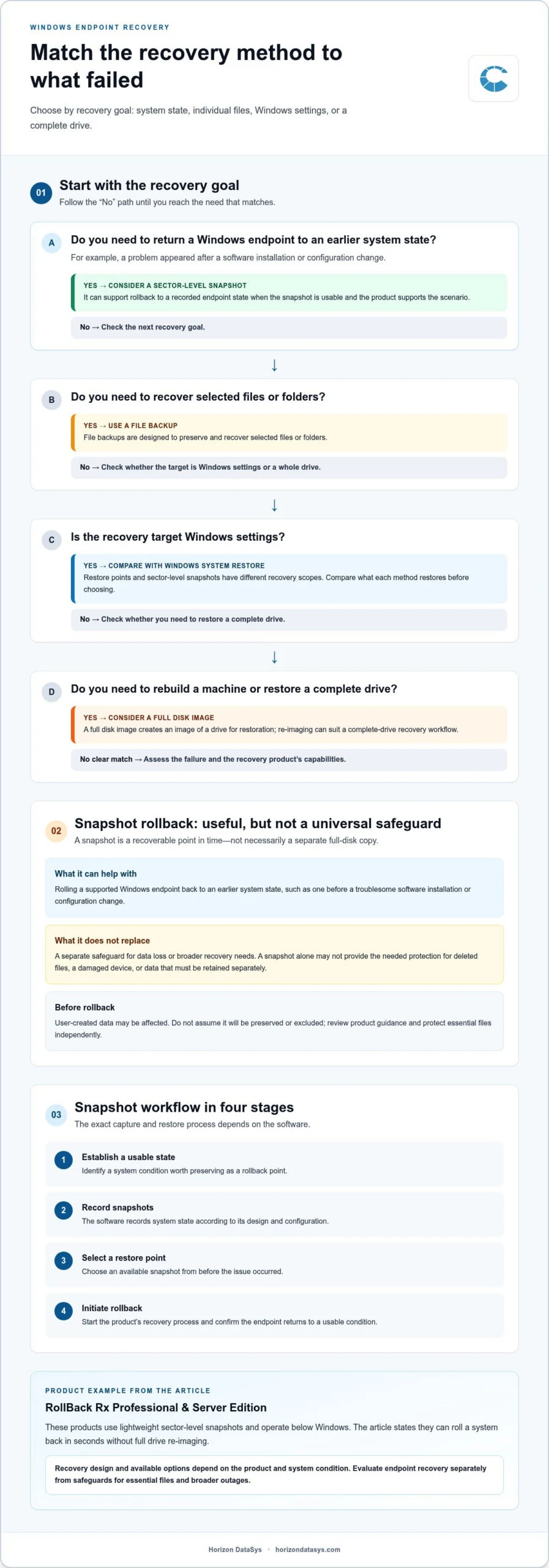
A snapshot workflow has four broad stages: establish a usable system state, record snapshots, choose a suitable restore point, then initiate rollback. The sequence is straightforward, but the way a product creates snapshots and carries out recovery varies. Do not assume a particular copy-on-write method, what data is included, or how snapshots are stored unless the product documentation describes it.
- Establish a usable state: Identify a system condition worth preserving as a rollback point.
- Record snapshots: The software records system state according to its design and configuration.
- Select a restore point: Choose an available snapshot from before the issue occurred.
- Roll back: Start the product’s restoration process and confirm the endpoint returns to a usable condition.
How Does Snapshot Creation Differ From a Full Disk Image?
A snapshot records a recoverable system state; a full disk image creates an image of a drive for restoration. These approaches serve different workflows. Re-imaging can be appropriate when rebuilding a machine or restoring a complete drive, while snapshot rollback can offer a more targeted route to a previous endpoint state. This does not mean snapshots are always small or that images are inherently unsuitable. Microsoft’s overview of Bare Metal Backup describes a broader recovery approach that includes operating system files and data on critical volumes.
What Happens During a Rollback?
An administrator selects a suitable snapshot and starts the software’s recovery process. The result depends on the selected state, the endpoint’s condition, and the product’s restoration design. User-created data may be affected by a rollback, so do not assume it will be preserved or excluded. Review the product’s guidance and protect essential files independently.
Operating below Windows means the recovery software works outside the running Windows operating system. That distinction matters if Windows will not start: a restore workflow that requires a functioning Windows session may be difficult to access. A below-OS design can provide a recovery path outside that session, although the steps and available options depend on the product and system condition.
RollBack Rx Professional and RollBack Rx Server Edition use lightweight sector-level snapshots and operate below Windows. They can roll a system back in seconds without full drive re-imaging. For details on this approach, explore Windows endpoint rollback software.
Sector-Level Snapshots vs. Restore Points, Backups, and Disk Images
These recovery methods can sound similar because each preserves a way to return to an earlier condition. Their scope differs: sector level snapshot software focuses on endpoint system-state rollback, while other tools may target Windows settings, individual files, or a whole drive. Treat them as complementary controls, not universal substitutes.
| Method | Recovery scope | Typical purpose | Restoration approach | Key limitation |
|---|---|---|---|---|
| Sector-level snapshot | A recorded endpoint system state | Roll back after a supported system or software change | Select a snapshot and use the product’s rollback process | Doesn’t by itself provide an independent copy of essential data |
| Windows System Restore | Selected Windows system settings and components | Address certain system issues by returning Windows to a prior restore point | Use the Windows recovery workflow | It’s an operating-system recovery mechanism, with dependencies and scope distinct from snapshot software |
| File backup | Selected files and folders | Recover data that was deleted, changed, or lost | Restore files from a saved backup copy | Doesn’t necessarily return the entire endpoint to a previous system state |
| Full disk image | A captured drive or system image | Rebuild a machine or restore a broader drive state | Apply the image through the imaging workflow | Requires an image and a restoration process suited to the target system |
When Is a Snapshot Different From a Backup?
A snapshot supports rollback to a system state; a backup preserves recoverable copies of selected data. For example, reverting an endpoint after a problematic configuration change and retrieving a mistakenly deleted document are different recovery tasks. Backup designs vary, including where copies are stored, so make sure essential data has protection independent of the endpoint being rolled back. Snapshot software is one layer, not a complete backup strategy.
When Do Restore Points or Disk Images Fit Better?
Windows System Restore may be appropriate for supported operating-system recovery scenarios, while a disk image can suit broader rebuilding or standardized deployment. Choose based on what must be restored and the workflow available during the incident, rather than assuming one method is always faster or more reliable. Shared computer protection software can also help IT teams compare reset-on-restart protection with snapshot-based rollback. Reset-on-restart protection is another distinct approach: reboot-to-restore software and how it works explains how that differs from selecting a snapshot for rollback.
How to Evaluate Sector-Level Snapshot Software for Your Environment
Start with the recovery problem, not the feature list. Sector level snapshot software is most useful when its rollback capabilities align with the failures your endpoints actually face. Workstations and servers may have different priorities: a staff desktop and a system supporting essential services do not necessarily have the same acceptable downtime, configuration needs, or recovery owner.
- Define failure scenarios. Identify whether the goal is to undo a software or configuration change, restore lost files, or rebuild a complete system. Note which incidents require a separate backup or disaster recovery control.
- Identify endpoint roles. Group devices by function, configuration sensitivity, and operational importance. Document acceptable downtime and who is responsible for initiating and validating recovery.
- Test recovery in a controlled environment. Pilot representative scenarios before broad deployment, including a software change, a configuration issue, and a startup problem. Use test endpoints rather than relying on assumptions about how rollback will behave.
- Assess administration. Record the recovery steps, administrator effort, and any application-specific dependencies. Consider whether the people responsible for recovery can identify a suitable restore point and complete the documented workflow.
- Validate safeguards. Confirm which risks rollback is intended to address and which require separate protection. In particular, do not treat a system snapshot as an independent copy of important user data.
Which Recovery Requirements Should IT Define First?
Write down endpoint roles, acceptable downtime, configuration sensitivity, and recovery ownership before comparing tools. Then map each failure scenario to its required outcome: undo a change, retrieve files, or restore a complete system. Workstations may prioritize returning a user device to a known-good state; servers may need recovery planning that accounts for service dependencies and the impact of interruption.
What Should a Pilot Test Measure?
Run the recovery workflow against realistic, controlled test cases, including a scenario where Windows startup is affected if that is part of the intended use. Track the steps required, administrator involvement, application behavior, and whether the outcome matches expectations. A test should also expose gaps: rollback may address the system condition, while file recovery or a broader outage may need another control.
Use pilot findings to refine deployment criteria and recovery procedures before expanding to additional endpoints. For a broader evaluation framework, see the Windows system rollback software buying guide. To explore endpoint rollback options, review Horizon DataSys recovery software.
Where RollBack Rx Fits in a Sector-Level Snapshot Strategy
RollBack Rx Professional and RollBack Rx Server Edition are sector-level snapshot software for Windows endpoint rollback. They use lightweight sector-level snapshots to help return a system to an earlier state in seconds, without full drive re-imaging. In a recovery plan, they fit in the rollback layer: a way to address supported endpoint issues without treating every incident as a complete rebuild.
How Does RollBack Rx Relate to the Concepts in This Guide?
The basic idea is to preserve recoverable system states and use a selected snapshot to roll an endpoint back when appropriate. RollBack Rx Professional serves workstation recovery needs, while RollBack Rx Server Edition is intended for server environments. Both use the stated snapshot and rollback approach, but instant system restore Windows Server requirements are not interchangeable with workstation needs.
For example, an IT team might assess whether rollback fits its response to a disruptive software or configuration change. It should separately plan for needs snapshots do not address by themselves, such as recovering important files or responding to a broader infrastructure incident. The question is whether rollback fills a defined gap in endpoint recovery, not whether one method replaces every other control.
What Should a Balanced Recovery Plan Include?
A reliable plan combines suitable recovery methods with clear responsibilities. Define who maintains the rollback process, who tests it, and how administrators document restoration steps. Pair endpoint rollback with separate data-protection and disaster-recovery controls suited to the organization’s needs. This prevents a recoverable system state from being mistaken for an independent data copy or a complete continuity plan.
Make testing part of routine operations. Use representative endpoints to verify that snapshots and restoration procedures behave as expected, and record any changes to the process. As applications, systems, and operational priorities evolve, revisit recovery objectives so the chosen safeguards remain aligned with actual requirements.
RollBack Rx fits environments where Windows endpoint rollback is a defined need. Use the Windows system rollback software buying guide to review evaluation criteria and assess how the approach fits documented recovery requirements.
Build a Recovery Plan Around the Right Tools
Choosing recovery software starts with identifying what needs to be restored. Sector level snapshot software provides a rollback option for supported endpoint system-state issues; file backups and disk images serve different recovery purposes. These methods can complement one another, helping IT teams plan for endpoint stability and separate data protection needs.
RollBack Rx Professional and RollBack Rx Server Edition use lightweight sector-level snapshots to roll systems back in seconds without full drive re-imaging. They are examples of how rollback can fit into an endpoint recovery plan, not a replacement for every safeguard. Define your recovery requirements, test representative scenarios, and document who owns each step.
With clear roles for rollback, backups, and broader recovery controls, administrators can make more deliberate decisions and strengthen operational continuity. Explore Windows system rollback software to see how RollBack Rx can fit your endpoint recovery needs.
Frequently Asked Questions
How do sector-level snapshots work?
Snapshot software generally establishes a recoverable system state, records snapshots according to its architecture, then provides a process for selecting and restoring a prior state. Products differ in how they capture, store, and apply snapshots, so the term does not describe one universal mechanism. Review product guidance and test representative recovery scenarios in a controlled environment to understand what a particular tool can restore and how administrators initiate the process.
Are sector-level snapshots the same as backups?
No. Snapshots are generally used to roll an endpoint back to an earlier system state, while backups preserve recoverable copies of data or systems according to their design. Their scope and storage arrangements vary. A snapshot should not automatically be treated as an independent backup or as protection against every kind of data loss or hardware failure. Plan separate safeguards for essential files and recovery needs beyond endpoint rollback.
Can snapshot software recover Windows if it will not start?
Some products operate below Windows and may provide a recovery path when the operating system will not start, but capabilities and workflows vary. RollBack Rx Professional and RollBack Rx Server Edition operate below the Windows operating system. Review the product’s recovery process and test relevant startup-failure scenarios before relying on it. Maintain separate recovery controls for incidents snapshots do not address, including data loss or broader system failures.
How are sector-level snapshots different from disk imaging?
A disk image is created to restore or deploy a broader system or drive state, while snapshot software provides a way to roll back to a selected state through its own capture and recovery design. Each can serve a different operational need. Compare the restoration scope, process, dependencies, and intended use for your environment. Neither approach should be assumed to replace the other; the right choice depends on what must be recovered.
When should an IT team consider sector-level snapshot software?
Consider sector level snapshot software when endpoint teams need a repeatable way to roll systems back after selected software or configuration changes. First define the scenarios, endpoint roles, and acceptable recovery process. Then test the workflow in a controlled environment and record the results. Assess snapshots alongside file backups and broader disaster recovery controls, since the right fit depends on product behavior and the organization’s operational requirements.