
Can a reboot restore solution keep shared workstations consistent across a network without adding repetitive work for IT? Each user session can leave behind changes, and restoring computers individually takes time. The right approach starts with a clear baseline and a practical way to manage it across endpoints.
Reboot Restore Enterprise returns managed computers to a clean baseline on restart and provides centralized tools for managing reboot-to-restore configurations across network environments. This guide explains how to assess whether that model fits your organization, how it differs from backup and endpoint security, and what to check before licensing. You’ll find evaluation criteria for shared-computer environments, centralized management, Windows compatibility, deployment requirements, and ongoing operations. The aim is to help you make an informed decision based on your endpoints and workflows.
Key Takeaways
- Reboot-to-restore software can return shared workstations to a defined baseline after restart.
- Assess whether a reboot restore solution’s centralized management approach fits your endpoint environment and administrative needs.
- Compare solutions by baseline behavior, documented management controls, endpoint compatibility, and operational requirements.
- Use a controlled pilot to test configurations and workflows before expanding deployment across your network.
- Set clear boundaries: restart-based restoration doesn’t replace backup, persistent-data planning, or layered endpoint security.
What an enterprise reboot restore solution should solve
Shared computers can change throughout the day. Users may adjust settings, download files, or leave applications in a different state. Updates and configuration changes can also create differences between endpoints. When administrators have to restore machines one at a time, maintaining consistency becomes recurring work.
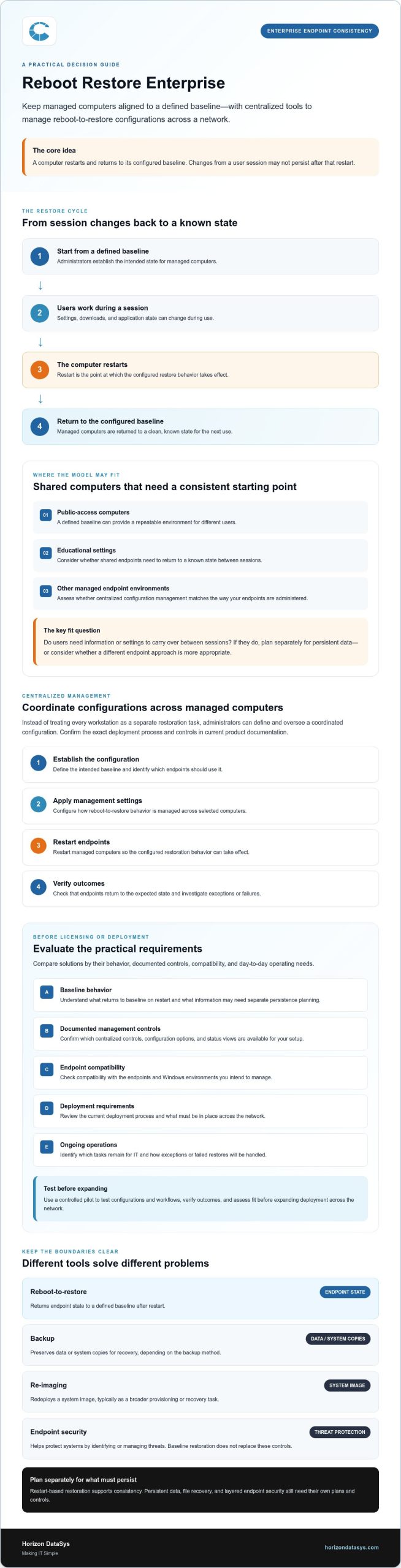
A reboot restore solution returns computers to a configured baseline when they restart. In practical terms, changes made during a session may not be retained after the next restart. This can simplify routine endpoint administration, but it doesn’t address every operational or security need. Organizations still need separate processes for protecting important data, recovering files, and managing security.
Which enterprise environments may benefit from reboot-to-restore?
Reboot-to-restore can suit shared workstations where different users need a consistent starting environment, including public-access computers, educational settings, and other managed endpoint environments. The key question is whether users need information or settings to carry over between sessions. If they do, decide how to preserve that information separately or whether a different endpoint approach is more appropriate.
Horizon DataSys’ Reboot Restore Enterprise returns managed computers to a clean baseline on restart and provides centralized tools to control and automate configurations across network environments. The general model is described in Reboot to restore software, including its use on multi-user systems.
What does "restore on reboot" mean for administrators?
Restore on reboot means automatically returning a computer to its configured baseline when it restarts, so session changes may not persist. Administrators can use this behavior as a repeatable way to return endpoints to a known state. It differs from recovering a particular file or restoring a full system from backup.
These approaches address distinct needs:
- Reboot-to-restore returns endpoint state to a defined baseline after restart.
- Backup preserves data or system copies for recovery, depending on the backup method.
- Re-imaging redeploys a system image, typically as a broader provisioning or recovery task.
- Endpoint security helps protect systems by identifying or managing threats. Baseline restoration doesn’t replace those controls.
Keeping these roles clear helps avoid gaps. Reboot-to-restore software can support endpoint consistency, while persistent data, file recovery, and protection from threats require their own plans and controls.
How centralized reboot-to-restore management works across endpoints
Centralized management gives administrators a coordinated way to control reboot-to-restore configurations for managed computers across a network. Rather than handling every workstation as a separate restoration task, IT can define the intended baseline and manage how the configuration is applied across endpoints.
Horizon DataSys describes Reboot Restore Enterprise as providing centralized tools to control and automate reboot-to-restore configurations in network environments. A high-level workflow might include the following steps. Check current product documentation for the exact deployment process and controls:
- Establish the configuration: Define the intended baseline and identify which endpoints should use it.
- Apply management settings: Configure how the reboot-to-restore behavior is managed across the selected computers.
- Restart endpoints: Restart managed computers so the configured restoration behavior can take effect.
- Verify outcomes: Check that endpoints return to the expected state and investigate any exceptions or failures.
This approach creates a repeatable process for overseeing endpoint consistency. Don’t assume that every setting, deployment method, or status view is available in every configuration. Confirm the current Enterprise feature set before relying on a particular control.
How does a centralized restore workflow differ from manual resets?
Manual resets require administrators to handle restoration at individual workstations, which can become repetitive across a network. Centralized management shifts the focus to defining and overseeing a coordinated configuration, while restart-based restoration returns computers to the baseline. The practical effect depends on endpoint count, existing workflows, and product settings. Review the current documentation to confirm which controls are included and what tasks remain for IT.
What should an administrator confirm about network management?
Before deployment, verify supported Windows versions, network prerequisites, and any management-console requirements for your environment. Ask how configuration changes are authorized and applied, and how administrators can check whether endpoints follow the intended configuration. These details affect rollout planning and day-to-day oversight.
Decide how to handle exceptions, maintenance windows, and approved changes that need to remain in place. For example, updates or configuration changes may require a documented procedure before normal baseline behavior resumes. Confirm the product-specific process rather than assuming a change will persist. For details to support your review, see Reboot Restore Enterprise information.
How to evaluate an enterprise reboot restore solution against operational requirements
Start with what your endpoints need to do, then compare those requirements with documented product capabilities. Evaluate more than baseline behavior: administrators also need to understand available network controls, endpoint compatibility, and the work involved in rollout and ongoing operations.
| Evaluation area | Questions to answer | What to verify |
|---|---|---|
| Baseline behavior | What state should a computer return to, and when? | Confirm how restart-based restoration works and how planned changes are handled. |
| Centralized controls | How will administrators manage configurations across endpoints? | Review documented console functions, access controls, monitoring, and policy options. |
| Endpoint fit | Do supported systems match your workstation inventory? | Verify Windows versions, prerequisites, and supported deployment configurations. |
| Operational effort | What tasks remain for IT during rollout and ongoing use? | Assess configuration, exception handling, verification, and maintenance workflows. |
Which requirements belong on an enterprise evaluation checklist?
Prepare an endpoint inventory before comparing products. Include endpoint types and operating systems, user workflows, restart patterns, and files or settings that need to persist. Document administrator access needs, policy controls, monitoring expectations, and how exceptions will be handled. Check compatibility and deployment prerequisites against current product documentation instead of assuming that products in the same category work alike.
Use product documentation or vendor discussions to confirm:
- Which operating systems and deployment configurations are supported?
- What management-console functions and administrator permissions are available?
- How are configuration changes applied, and how is endpoint status monitored?
- How can teams manage exceptions and planned changes that need to persist?
How does reboot-to-restore compare with backups and re-imaging?
Each approach serves a different operational need. Reboot to restore software returns an endpoint to its configured baseline after restart; it isn’t a way to retrieve a specific deleted file. Backup is a separate consideration for retaining and recovering required data. Re-imaging deploys a system image and may be appropriate for provisioning or broader recovery tasks. Don’t assume that any one of these methods replaces the others.
Reboot Restore Enterprise is described as providing centralized management of reboot-to-restore configurations across network environments, with managed computers returning to a clean baseline on restart. Before deciding whether that meets your requirements, verify current console functions, compatibility, and deployment prerequisites.
Plan a controlled rollout and set clear protection boundaries
A pilot lets IT compare endpoint behavior with real workflows before applying a configuration more broadly. Treat it as a controlled operational change: define what a successful test looks like, assign support responsibilities, and agree how to pause or reverse the rollout if results don’t meet expectations.
What should an enterprise pilot test before broader deployment?
Select representative endpoints that reflect different users, applications, and work patterns. Include routine sessions and planned maintenance to see whether the baseline supports everyday tasks and whether approved changes behave as expected. Record what happens during testing. A successful restart alone doesn’t demonstrate that every requirement has been met.
- Inventory endpoints: Select a manageable group that represents the intended deployment environment.
- Define the baseline: Document required applications, settings, and data that must remain available.
- Test workflows: Have typical users complete regular tasks, then restart endpoints and review their resulting state.
- Check planned changes: Test updates and administrative changes using the documented product process. Confirm whether they persist as intended.
- Review and expand gradually: Record issues, exceptions, support ownership, and a rollback or pause plan before adding endpoints.
For changes intended to persist, follow an approved change process and verify the product-specific steps first. This reduces the risk of a routine restart undoing work administrators expected to retain.
What should reboot-to-restore not be expected to replace?
Reboot Restore Enterprise returns managed computers to a clean baseline on restart; it is not a complete backup, disaster-recovery plan, or endpoint-security program. Its role is to support consistent endpoint states through restart-based restoration. Other controls address data recovery and security needs.
Maintain appropriate data-protection processes for information the organization needs to retain, and keep layered security controls suited to organizational requirements. A baseline reset may help address unwanted endpoint changes, but it shouldn’t be treated as assurance that every threat is prevented or every lost file can be recovered. Check current vendor documentation for the product’s precise protection behavior and limitations.
Before expanding a pilot, review the results with endpoint owners and security stakeholders. Resolve workflow conflicts, clarify which changes require approval, and make sure existing processes still cover recovery and security responsibilities. For information about the product’s role in a rollout, see Reboot Restore Enterprise details.
When Reboot Restore Enterprise fits, and how to assess next steps
Reboot Restore Enterprise may suit organizations seeking centralized control of restart-based baseline restoration across managed computers. It returns managed endpoints to a clean baseline on restart and provides tools to control and automate reboot-to-restore configurations across network environments. This model can align with shared workstations where users need a consistent starting state and administrators want to coordinate configuration management.
Fit depends on what each endpoint needs to support. Review the approach carefully if users rely on local files or settings that must persist, departments need different configurations, or specialized workflows depend on changes surviving a restart. These needs don’t automatically rule out reboot-to-restore, but they should inform the pilot, exception process, and separate data-recovery plan.
Is Reboot Restore Enterprise a fit for your endpoint environment?
Consider it when shared or managed endpoints need to return to a defined state and centralized configuration control is an operational priority. Review endpoints individually if persistent user data, specialized applications, or planned changes complicate that model. Confirm compatibility, prerequisites, integrations, performance expectations, and deployment scale against current documentation rather than assuming they are supported.
What should buyers confirm before licensing?
Before deciding, request current technical requirements, feature documentation, and licensing details. Confirm which management-console functions are included, how configurations are applied and monitored, and what implementation work your team will handle. Clarify support responsibilities and the documented process for exceptions or changes that need to remain in place.
Useful questions include:
- Which Windows versions and deployment configurations are currently supported?
- What network or infrastructure prerequisites apply?
- Which administrator controls and monitoring functions are documented?
- How should planned updates, persistent data, and endpoint exceptions be handled?
- What licensing terms and support options apply to your intended deployment?
Compare the answers with the requirements established during evaluation and piloting. If the fit looks promising, review Reboot Restore Enterprise product information and request the current documentation needed to assess your environment before licensing.
Make Your Endpoint Decision With Confidence
A consistent workstation environment starts with a defined baseline and a clear understanding of what users need to retain. A reboot restore solution can help coordinate restart-based restoration across managed endpoints, but it should be evaluated against operational requirements rather than treated as a universal fix.
Before deciding, confirm the management controls and technical prerequisites that apply to your environment. Test representative workflows, decide how approved changes and persistent data will be handled, and maintain backup and security processes for needs that baseline restoration doesn’t address.
Reboot Restore Enterprise is designed to return shared computers to a clean baseline upon restart, with centralized tools to control and automate reboot-to-restore configurations across network environments. Include current product documentation and licensing details in your evaluation. Explore Reboot Restore Enterprise and review the requirements for your endpoints before moving forward. A deliberate assessment can help your team choose a practical path toward more consistent workstations.
Frequently Asked Questions
What is a reboot restore solution?
A reboot restore enterprise solution returns managed computers to a defined baseline when they restart. An enterprise edition can include centralized tools for controlling and automating configurations across network environments. Reboot Restore Enterprise provides these tools and returns managed computers to a clean baseline on restart. Review current product documentation to confirm its settings, supported endpoints, and administrative controls for your organization.
How does centralized reboot-to-restore management work?
Administrators use centralized tools to manage how endpoints return to a clean baseline. They define the intended configuration, apply management settings, and check whether endpoints behave as expected after restarting. This coordinated process can make restoration more consistent than handling each workstation separately. Available policies, monitoring functions, and deployment requirements depend on the product and configuration, so verify them in current technical documentation before planning a rollout.
Can reboot restore software replace endpoint security or antivirus?
No. Reboot-to-restore software shouldn’t be treated as a complete replacement for endpoint security. It restores a configured system state after restart, while security controls address other prevention, detection, and response needs. A reset doesn’t mean every threat is prevented or detected. Maintain security controls that fit your organization’s requirements, and review the product’s documented protection scope.
Does reboot-to-restore software replace backups?
No. Restart-based baseline restoration and backup serve different purposes. Reboot-to-restore returns an endpoint to a configured state, while backup processes are intended to retain and recover data the organization needs to preserve. Identify where users or applications create files that must remain available after a restart, then plan how to protect and recover that information. Don’t assume that resetting a computer can retrieve a specific file or replace a backup process.
What happens to user changes after a computer restarts?
Changes made during a session may not remain if the computer is configured to return to its baseline on restart. The exact behavior depends on product settings and the environment’s configuration. Before deployment, test ordinary user workflows, required applications, updates, and administrative changes. Identify which data or settings must persist, then confirm the approved process for handling those exceptions in current product documentation.
How should an organization evaluate Reboot Restore Enterprise?
Document endpoint types, user workflows, baseline requirements, restart patterns, and changes that need to persist. Then verify Reboot Restore Enterprise’s centralized management functions, supported configurations, technical prerequisites, and licensing details with Horizon DataSys. Test representative endpoints to identify workflow exceptions before expanding deployment. Finally, confirm how restart-based restoration fits alongside separate backup and security controls, so each operational need has a defined approach.